
Behind every weather forecast lies a software system that has evolved over many years.
These systems are rich in capability, but their size and diversity can make them hard to explore, particularly for those new to the codebase or venturing beyond familiar ground.
At ECMWF, the Integrated Forecasting System (IFS) is a prime example of this challenge. It sits at the core of our forecasting capability and underpins a wide range of Earth system applications.
Developed over decades, the IFS is a highly sophisticated system. It includes a data assimilation system and a global numerical model of the Earth system, as well as the supporting infrastructure to make forecast products available to our Member and Co-operating States and other users.
For those of us working with the IFS, it means navigating an extensive and unusual ecosystem where code, documentation and workflows are distributed across multiple repositories and file types. The information we need is there, but it’s fragmented, and understanding how the different components connect can take time, especially when exploring unfamiliar parts of the system.
To help address this, we developed the IFS Assistant, a new artificial intelligence (AI) tool.
Helping users navigate the IFS
The IFS Assistant is designed to help users find and understand information across the IFS codebase and documentation.
The assistant can support users with tasks such as:
- finding the definition, usage and purpose of symbols across the codebase
- understanding how modules interact
- connecting code with relevant documentation
This can be particularly useful when working outside a user's usual area of expertise. Instead of searching through multiple repositories and documents manually, browsing the codebase and running tools like grep through files, users can begin with a question in natural language and use the assistant to help them quickly find their way through the system.
The assistant is not intended to replace the expertise of IFS developers. Rather, it provides another way to access the knowledge contained in the system, helping users spend less time searching and more time understanding and working with the code.
Why we built an AI assistant
For anyone working with the IFS, a lot of time goes into finding and connecting information. We often need to understand relationships: which routines call which, how modules interact, and where specific concepts are documented.
Generic conversational AI tools are not well suited to this context. The assistant must operate on-premises to meet security requirements for closed-source code repositories, while also minimising hallucinations by managing the use of Large Language Model (LLM) context windows and by grounding responses in indexed and verifiable content.
We designed the IFS Assistant specifically around these needs. Rather than acting as a general-purpose chatbot, it grounds responses in indexed IFS code and documentation, helping users explore the system while keeping answers traceable and verifiable.
From question to answer
In practice, the assistant works as a search-and-retrieval tool for the IFS. Users ask a question through a web interface, and the assistant looks for relevant information in indexed code and documentation before generating an answer grounded in those sources.
The work builds on foundations laid by code-oriented tools developed by ECMWF, such as Loki, and by several EU‑funded Horizon Europe projects, including EO4EU, MeDiTwin and DeployAI, which explore state-of-the-art technologies such as cloud computing and AI.
At a high level, the assistant searches indexed IFS content to identify information relevant to a user's question. It combines keyword searches with searches that identify related concepts, helping it find both specific code elements and related concepts across code and documentation.
The retrieved information is then provided to a language model as context for generating an answer.
The approach is supported by an indexing pipeline that processes different types of content, including Fortran and Python source code, PDFs, notebooks and other text. The pipeline also captures information about the structure and context of the source material, helping the assistant preserve relationships between code, documentation and other source material.
The result is a local, repository-grounded tool that can help users explore the IFS while keeping the information behind its answers connected to the underlying source material.
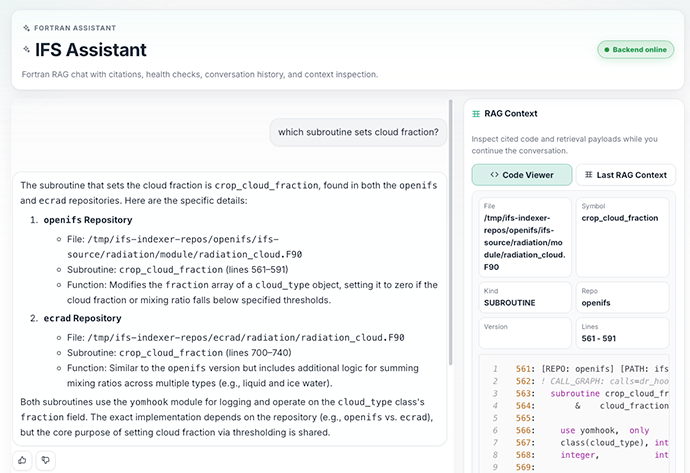
A screenshot of the IFS Assistant web-based frontend.
Reliability, deployment and current use
The assistant is deployed on an RKE2 Kubernetes cluster (Figure 1) hosted on the European Weather Cloud (EWC) (reachable at https://ifs-assistant.apps.ifs-llm.ewcloud.host/) and is integrated with the ECMWF Single Sign On (SSO) infrastructure. At the moment, the tool is in an experimentation phase, being piloted internally with access gradually being expanded to more users.
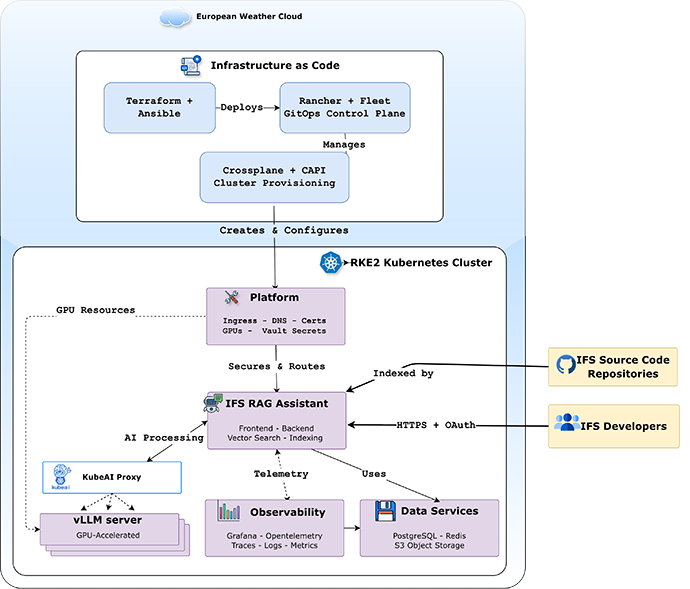
Figure 1: IFS Assistant infrastructure architecture. The diagram illustrates the GitOps pipeline and Kubernetes-based deployment together with all the components comprising the innovative tool. All the components are deployed in the European Weather Cloud (EWC).
Early experience suggests the assistant can reduce the time needed to locate relevant code or documentation and can make it easier to explore unfamiliar parts of the IFS ecosystem (including both closed and open-source code). Rather than manually searching through multiple repositories, users can start with a question and quickly identify relevant files, routines and documentation. For large scientific repositories, this approach offers a practical way to access dispersed technical knowledge in a more accessible form.
The assistant in action
The IFS Assistant is a flexible tool which can support a wide range of use cases. Here we highlight three interaction examples that illustrate both its strengths and current limitations.
Example 1: finding the right code
Initial user prompt: “Which subroutine sets cloud fraction?”
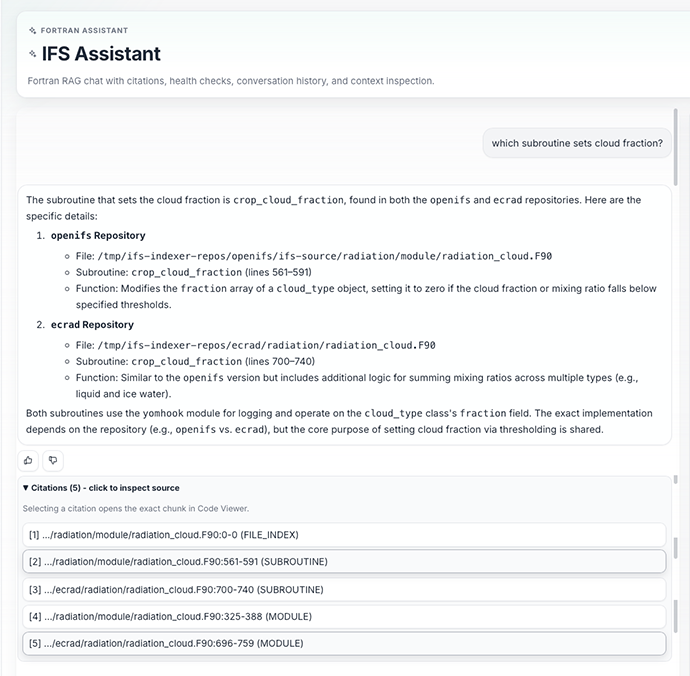
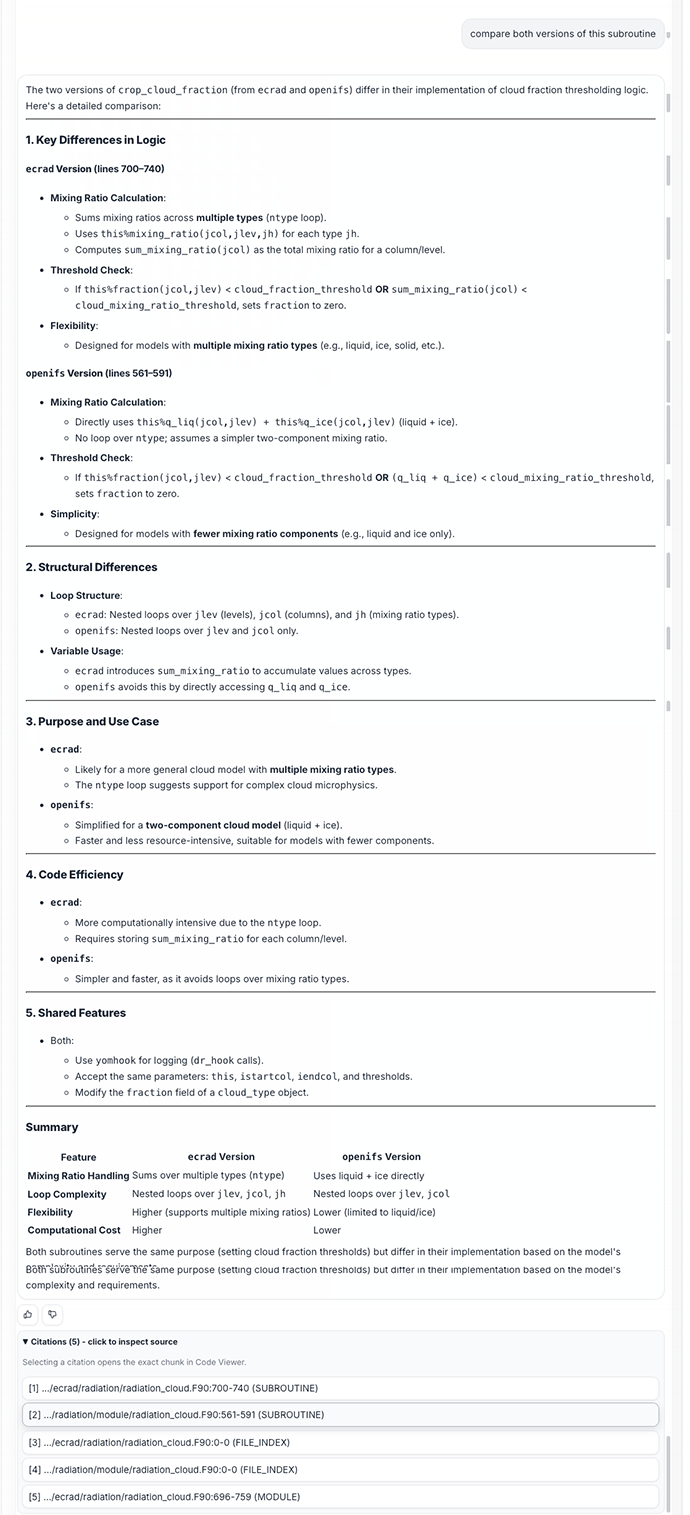
Example interaction in which the assistant locates relevant routines, explaining their purpose and comparing alternative implementations.
The assistant identifies the relevant subroutines and correctly follows up when prompted to compare different versions. This illustrates a benefit of the assistant: users can begin with a relatively simple question and continue exploring without having to start a new search.
This kind of interaction can be particularly useful when debugging, optimising or adding new features on top of existing code. Without the assistant, identifying the relevant parts of the code, their interactions and changes across versions might require searching multiple repositories and documentation and tracing code dependencies.
Example 2: exploring how a calculation works
User prompt: “I need to understand how the shortwave fluxes are computed in 'solver_mcica_sw' in ecRad; and specifically, how the calculation of full-sky fluxes differs from clear-sky fluxes?”
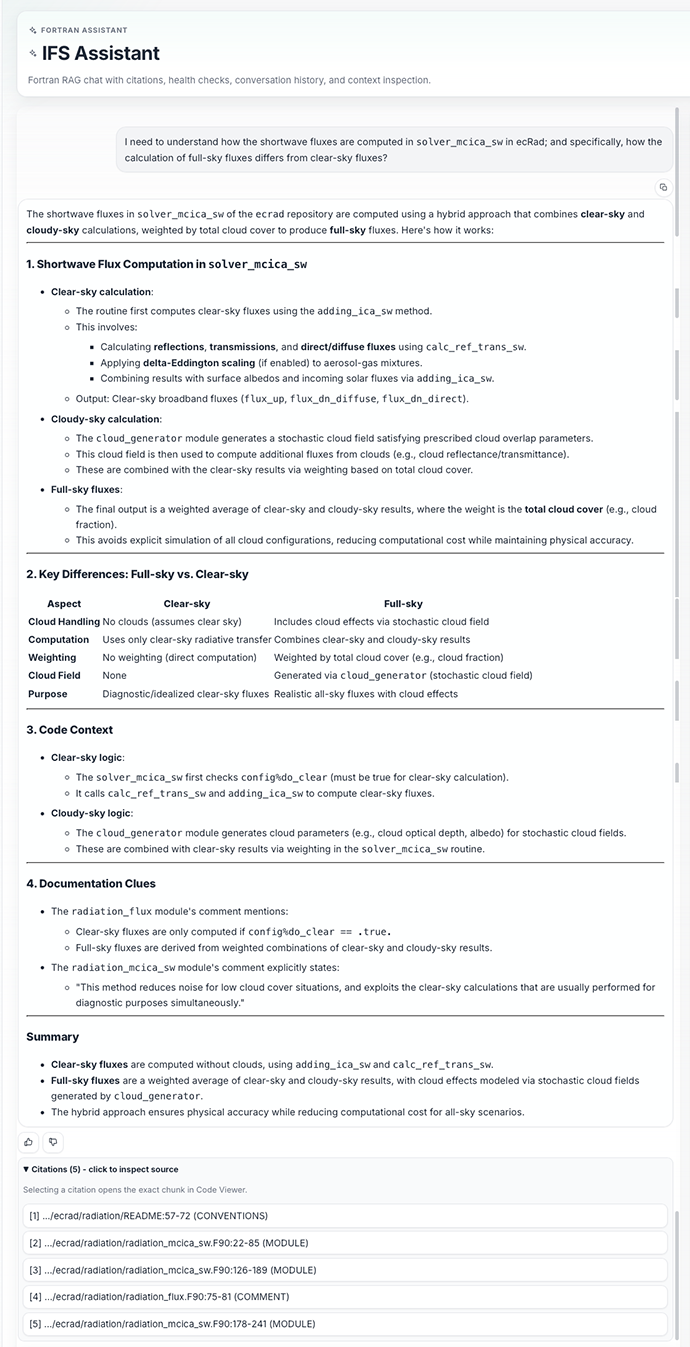
Example query exploring the calculation of clear-sky and full-sky fluxes.
Here, the assistant provides a reasonable response in line with the IFS developers’ knowledge. For a user trying to understand an unfamiliar part of the system, this type of interaction can provide a starting point for exploring the codebase.
Example 3: understanding how to make a change
Initial user prompt: “How do I add a new gridpoint parameter to IFS?”
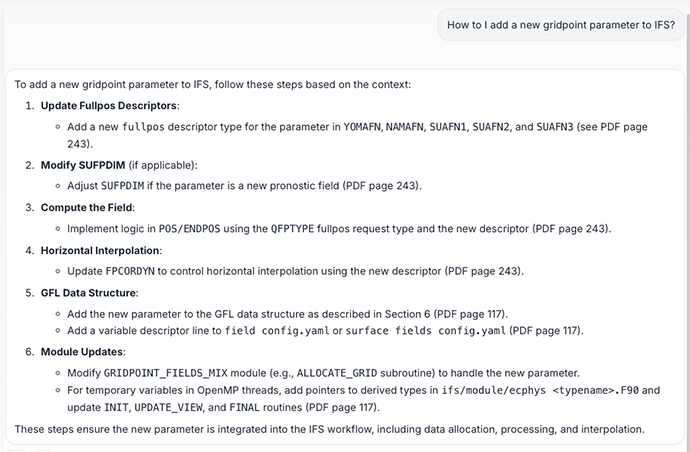
Example of the assistant providing step-by-step guidance for implementing a new gridpoint parameter, drawing on indexed documentation and code references.
In this case, the assistant produces an answer that is accurate with respect to the IFS documentation, but it is heavily weighted towards the documentation. This highlights a limitation: if source code and documentation drift apart, the answer provided by the IFS Assistant might not be accurate. The example also illustrates why the assistant should be viewed as a tool to support, rather than replace, expert judgement. We plan to improve these shortcomings in the next phase.
Evolving the tool
The IFS Assistant is still evolving, but it already gives us a sense of what AI-assisted software engineering might look like in practice.
Importantly, it is not intended to replace developer expertise. Instead, it amplifies it, helping users move more efficiently through a complex codebase while keeping answers anchored in trusted sources.
As we continue developing the system, we will incorporate new features, such as support for user-defined repositories, role-based access control for more fine-grained security and support for code assistants. Over time, we see the assistant becoming an increasingly valuable part of the wider IFS development environment, fostering both productivity and knowledge sharing across teams.
Top banner image: © AJ Unick Creator / Adobe Stock